
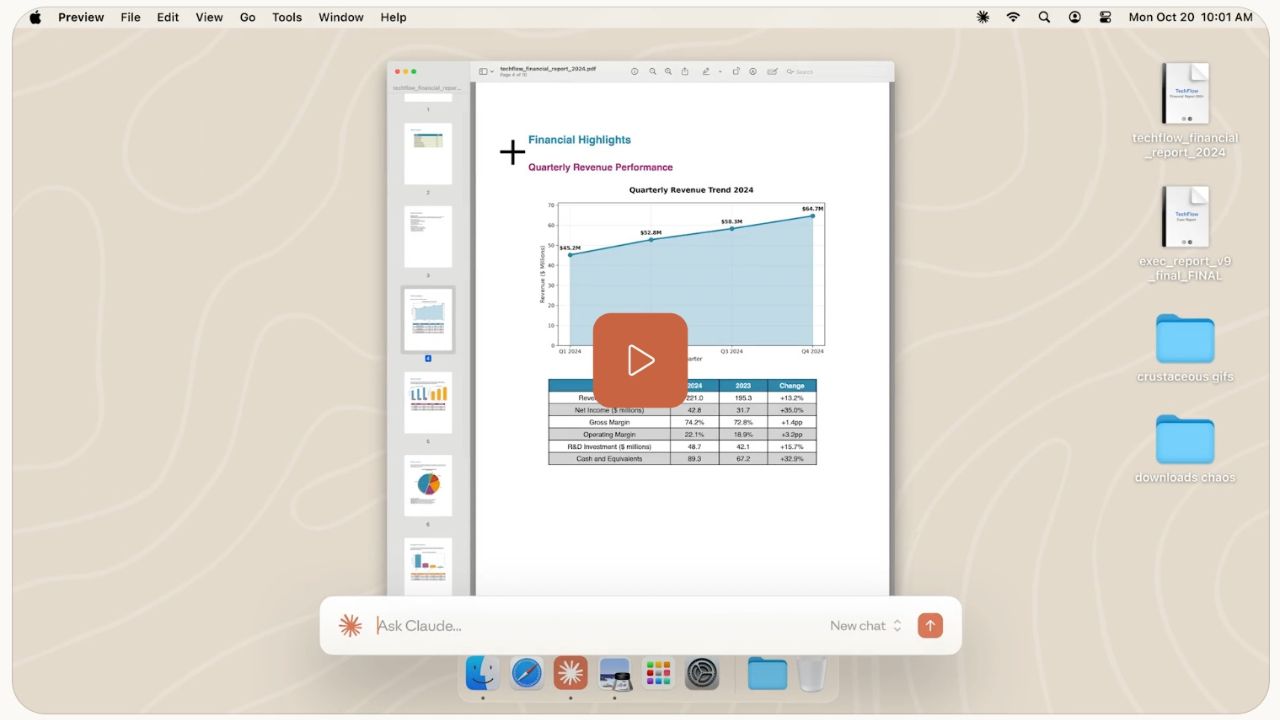
If you're like most knowledge workers, your digital workspace is a battlefield of tabs, apps, and constant context-switching. You know AI tools like Claude can help, but jumping back and forth to a browser tab breaks your flow and shatters your focus.
What if your AI collaborator wasn't in another tab, but was a seamless part of your workspace, ready to help the moment you need it?
That vision is now a reality. The team at Anthropic has officially launched Claude Desktop, a fundamental shift from using an AI tool to working with an AI teammate. Paired with the powerful new Claude Code, this release marks the most significant step yet in making AI a practical, integrated part of your daily workflow.
First, What Exactly is Claude?
Before we dive into the new features, let's set the stage. Claude is more than just another chatbot. Developed by Anthropic, it's an AI assistant designed to be helpful, honest, and harmless. Think of it as a brilliant, conscientious colleague.
Unlike simpler tools, Claude excels at:
- Complex Reasoning: Breaking down multi-step problems and explaining its logic.
- Long-Context Understanding: Processing and analyzing massive documents (100K+ tokens) in a single conversation.
- Creative Collaboration: Brainstorming, drafting, and refining ideas with you.
- Code Generation & Debugging: Writing, explaining, and fixing code across dozens of programming languages.
Claude was built to be a true collaborator, and with this new desktop launch, it's moving from your browser to your side.
The Agile Evolution: How Claude Desktop Came to Life
The development of Claude Desktop is a textbook example of Agile methodology in action. Anthropic didn't build this in a dark room for two years and release a monolithic, final product. Instead, they started with a core, valuable premise and iterated based on real-world use.
Phase 1: The Foundation (Web & Mobile)
The journey began with the web interface and mobile apps, establishing Claude as a versatile, cross-platform assistant. This was the Minimum Viable Product (MVP), proving the core value of a conversational AI collaborator.
Phase 2: Listening and Learning
The Anthropic team actively engaged with their user community, developers, writers, researchers, and enterprise teams. They heard a consistent pain point: "We love Claude, but having it stuck in a browser tab limits its potential." The most requested feature was clear: system-level integration.
Phase 3: Iterative Rollout & The "Aha!" Moment
Instead of a single big-bang release, they began testing and rolling out features incrementally:
- Initial Desktop Access: The first desktop app provided a dedicated window, a small but meaningful step away from the browser.
- Integrating Feedback: The "aha" moment came from realizing that quick access and context-sharing were the real game-changers. This led to the development of the now-signature Mac features like the double-tap Option key and window-sharing.
- Expanding the Vision: The parallel development of Claude Code addressed a specific, high-value use case from their developer users, showing how they build not just a general tool, but specialized solutions for different workflows.
This Agile, user-centric approach is why the final product feels so intuitive; it was shaped by the very people using it every day.
Your New Desktop Co-pilot: Always Ready, Never in the Way
The core promise of Claude Desktop is simple: access without interruption. Claude stays ready in the background, there when you need it, never in your way when you don't.
Available for both Mac and Windows, you can keep Claude in your dock for instant access. But the real magic lies in the new desktop extensions that connect Claude directly to your local tools and files, allowing it to take action on your behalf.
Exclusive for Mac Users: The Ultimate Quick-Access Trio
Mac users get some particularly slick features that feel like something out of a sci-fi movie:
- Instant Access: Double-tap the Option (⌥) key from any app to bring Claude to the forefront. No more hunting for a window.
- Share Your Work Effortlessly: Capture screenshots, click app windows to share their context directly, or simply drag files into your chat. Claude can finally see what you see.
- Think Out Loud: Hit Caps Lock and start talking. This voice input feature is perfect for brainstorming, working through complex problems aloud, or drafting emails and documents as you think.
Supercharge Your Development Workflow with Claude Code
For developers, this is a game-changer. Claude Code on the web allows you to delegate coding tasks directly from your browser. Think of it as having a dedicated coding assistant for your backlog.
Its ability to run multiple tasks in parallel is a killer feature, perfect for:
- Tackling bug backlogs efficiently.
- Handling routine fixes and refactors.
- Parallel development work, like generating documentation while you write a new feature.
Your Questions, Answered
Q: Do I need a paid plan to use the desktop or mobile apps?
A: No. The Claude apps are available to everyone, from Free to Enterprise plans. (Though some advanced features may be reserved for paid tiers).
Q: What's the real difference between the desktop app and my browser?
A: The desktop app is all about system integration. It's always accessible via your dock, features quick-entry shortcuts, and supports desktop extensions that connect to your local file system and native applications, something the browser can't do.
Q: Can I use the same account everywhere?
A: Absolutely. Sign in once, and your conversations, projects, memory, and preferences sync seamlessly across desktop, web, and mobile.
Q: How do I connect Claude to my tools?
A: This is done through Connectors:
- Web-based connectors (like Google Drive and Slack) work everywhere.
- Mobile connectors can link to device-specific apps like Maps and iMessage.
- Desktop extensions are the power-users' choice, installed locally to grant Claude access to your file systems, browsers, and other native apps.
Ready to Install? Get Claude on Your Desktop Now.
The best way to understand this shift is to experience it. Download the official Claude Desktop app and feel the difference for yourself.
- Download for macOS (Universal): https://claude.ai/api/desktop/darwin/universal/dmg/latest/redirect
- Download for Windows (x64): https://claude.ai/api/desktop/win32/x64/exe/latest/redirect
- Download for Windows (ARM64): https://claude.ai/api/desktop/win32/arm64/exe/latest/redirect
Bringing Claude to Your Entire Team
For organizations looking to standardize, the Claude desktop app supports enterprise deployment with MSIX (Windows) and PKG (Mac) installers. IT teams can control version updates, enable automatic SSO for managed devices, and pre-approve which desktop extensions the team can access for security and compliance.
The Future of Work is Integrated
The era of the isolated AI chat window is over. With Claude Desktop, your AI collaborator is now an integrated part of your digital workspace, ready to help you code faster, think more clearly, and automate mundane tasks. It's the culmination of an Agile, user-focused journey to build not just a product, but a perfect partner for your workflow.
Where to next?
Visit the official Claude Help Center for setup guides, troubleshooting, and full system requirements.
Your turn: What's the first task you'll tackle with Claude on your desktop? Let us know!